vue-property-decorator
基于装饰器语法的 Vue.js 插件,它扩展了 Vue 组件的定义方式,使得编写 Vue 单文件组件更加简洁和易读
内部实现依赖与 vue-class-component
核心思想
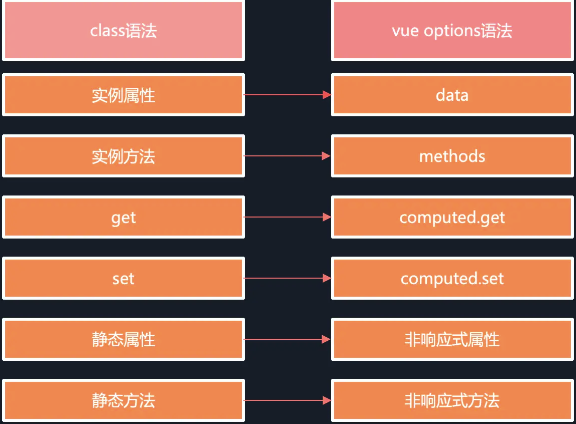
ts 装饰器 Decorator 是为在类、类成员上通过元编程语法添加标注的功能。因此我们可以利用 ts 装饰器的功能,将 class 转换成 vue 实例
@Prop
@Prop(options?: PropOptions | Constructor[] | Constructor)
propertyName: type;

@Prop(Number) readonly propA: number | undefined
@Prop({ default: 'default value' }) readonly propB!: string
@Prop([String, Boolean]) readonly propC: string | boolean | undefined其中,propertyName 是你要定义的属性的名称,type 是该属性的类型。options 是一个可选的配置对象,用于指定其他属性选项,例如默认值、是否是必需的等。
PropOptions
interface PropOptions {
  type?: PropType<any>;
  required?: boolean;
  default?: any;
  validator?(value: any): boolean;
}validator:一个函数,用于验证属性的值是否有效。
最终会转换成
export default {
  props: {
    propA: {
      type: Number
    },
    propB: {
      default: 'default value'
    },
    propC: {
      type: [String, Boolean]
    }
  }
};属性的 ts 类型后面需要加上 undefined 类型;或者在属性名后面加上!,表示非 null 和 非 undefined 的断言,否则编译器会给出错误提示
原理
export function createDecorator (factory: (options: ComponentOptions<Vue>, key: string, index: number) => void): VueDecorator {
  return (target: Vue | typeof Vue, key?: any, index?: any) => {
    const Ctor = typeof target === 'function'
      ? target as DecoratedClass
      : target.constructor as DecoratedClass
    if (!Ctor.__decorators__) {
      Ctor.__decorators__ = []
    }
    if (typeof index !== 'number') {
      index = undefined
    }
    Ctor.__decorators__.push(options => factory(options, key, index))
  }
}export function Prop(options: PropOptions | Constructor[] | Constructor = {}) {
return (target: Vue, key: string) => {
applyMetadata(options, target, key)
createDecorator((componentOptions, k) => {
;(componentOptions.props || ((componentOptions.props = {}) as any))[
k
] = options
})(target, key)
}
}@PropSync
用于实现在父子组件之间双向绑定同名的 prop 和子组件的 data 或 prop
@PropSync(propName: string, options: (PropOptions | Constructor[] | Constructor) = {})

@PropSync('name', { type: String }) syncedName!: string相当于
export default {
  props: {
    name: {
      type: String
    }
  },
  computed: {
    syncedName: {
      get() {
        return this.name;
      },
      set(value) {
        this.$emit('update:name', value);
      }
    }
  }
};通过使用 @PropSync 装饰器,我们可以更方便地实现父子组件之间的双向绑定,从而实现更灵活的组件通信方式。
注意,使用 PropSync 的时候是要在父组件配合.sync 使用的
原理
export function PropSync(
  propName: string,
  options: PropOptions | Constructor[] | Constructor = {},
) {
  return (target: Vue, key: string) => {
    applyMetadata(options, target, key)
    createDecorator((componentOptions, k) => {
      ;(componentOptions.props || (componentOptions.props = {} as any))[
        propName
      ] = options
      ;(componentOptions.computed || (componentOptions.computed = {}))[k] = {
        get() {
          return (this as any)[propName]
        },
        set(this: Vue, value) {
          this.$emit(`update:${propName}`, value)
        },
      }
    })(target, key)
  }
}@Model
用于定义 Vue 组件的双向绑定属性,即用于在父子组件之间进行双向数据绑定
@Model(event?: string, options: (PropOptions | Constructor[] | Constructor) = {})

@Model('change', { type: Boolean }) readonly checked!: boolean相当于
export default {
  model: {
    prop: 'checked',
    event: 'change'
  },
  props: {
    checked: {
      type: Boolean
    }
  }
};原理
export function Model(
  event?: string,
  options: PropOptions | Constructor[] | Constructor = {},
) {
  return (target: Vue, key: string) => {
    applyMetadata(options, target, key)
    createDecorator((componentOptions, k) => {
      ;(componentOptions.props || ((componentOptions.props = {}) as any))[
        k
      ] = options
      componentOptions.model = { prop: k, event: event || k }
    })(target, key)
  }
}@ModelSync
和@Model 类似,但是能改变参数名称
@ModelSync(propName: string, event?: string, options: (PropOptions | Constructor[] | Constructor) = {})

@ModelSync('checked', 'change', { type: Boolean })
readonly checkedValue!: boolean相当于
export default {
  model: {
    prop: 'checked',
    event: 'change'
  },
  props: {
    checked: {
      type: Boolean
    }
  },
  computed: {
    checkedValue: {
      get() {
        return this.checked;
      },
      set(value) {
        this.$emit('change', value);
      }
    }
  }
};原理
export function ModelSync(
  propName: string,
  event?: string,
  options: PropOptions | Constructor[] | Constructor = {},
) {
  return (target: Vue, key: string) => {
    applyMetadata(options, target, key)
    createDecorator((componentOptions, k) => {
      ;(componentOptions.props || ((componentOptions.props = {}) as any))[
        propName
      ] = options
      componentOptions.model = { prop: propName, event: event || k }
      ;(componentOptions.computed || (componentOptions.computed = {}))[k] = {
        get() {
          return (this as any)[propName]
        },
        set(value) {
          // @ts-ignore
          this.$emit(event, value)
        },
      }
    })(target, key)
  }
}@Watch
监听数据的变化,并在数据变化时执行相应的回调函数。
@Watch(path: string, options: WatchOptions = {})使用
@Watch('child')
onChildChanged(val: string, oldVal: string) {}

@Watch('person', { immediate: true, deep: true })
onPersonChanged1(val: Person, oldVal: Person) {}

@Watch('person')
onPersonChanged2(val: Person, oldVal: Person) {}

@Watch('person')
@Watch('child')
onPersonAndChildChanged() {}相当于
export default {
  watch: {
    child: [
      {
        handler: 'onChildChanged',
        immediate: false,
        deep: false
      },
      {
        handler: 'onPersonAndChildChanged',
        immediate: false,
        deep: false
      }
    ],
    person: [
      {
        handler: 'onPersonChanged1',
        immediate: true,
        deep: true
      },
      {
        handler: 'onPersonChanged2',
        immediate: false,
        deep: false
      },
      {
        handler: 'onPersonAndChildChanged',
        immediate: false,
        deep: false
      }
    ]
  },
  methods: {
    onChildChanged(val, oldVal) {},
    onPersonChanged1(val, oldVal) {},
    onPersonChanged2(val, oldVal) {},
    onPersonAndChildChanged() {}
  }
};原理
export function Watch(path: string, watchOptions: WatchOptions = {}) {
  return createDecorator((componentOptions, handler) => {
    componentOptions.watch ||= Object.create(null);
    const watch: any = componentOptions.watch;
    if (typeof watch[path] === 'object' && !Array.isArray(watch[path])) {
      watch[path] = [watch[path]];
    } else if (typeof watch[path] === 'undefined') {
      watch[path] = [];
    }

    watch[path].push({ handler, ...watchOptions });
  });
}@Provide / @Inject
语法
@Provide(key?: string | symbol) / @Inject(options?: { from?: InjectKey, default?: any } | InjectKey)使用
import { Component, Inject, Provide, Vue } from 'vue-property-decorator'

const symbol = Symbol('baz')

@Component
export class MyComponent extends Vue {
  @Inject() readonly foo!: string
  @Inject('bar') readonly bar!: string
  @Inject({ from: 'optional', default: 'default' }) readonly optional!: string
  @Inject(symbol) readonly baz!: string

  @Provide() foo = 'foo'
  @Provide('bar') baz = 'bar'
}相当于
const symbol = Symbol('baz');

export const MyComponent = Vue.extend({
  inject: {
    foo: 'foo',
    bar: 'bar',
    optional: { from: 'optional', default: 'default' },
    baz: symbol
  },
  data() {
    return {
      foo: 'foo',
      baz: 'bar'
    };
  },
  provide() {
    return {
      foo: this.foo,
      bar: this.baz
    };
  }
});Provide 原理
export function Provide(key?: string | symbol) {
  return createDecorator((componentOptions, k) => {
    let provide: any = componentOptions.provide;
    // 初始化inject
    inheritInjected(componentOptions);
    // 判断是否初始化provide
    if (needToProduceProvide(provide)) {
      //初始化provide
      provide = componentOptions.provide = produceProvide(provide);
    }
    // 要传下的属性绑定在managed上
    provide.managed[k] = key || k;
  });
}import Vue, { ComponentOptions } from 'vue'
export function needToProduceProvide(original: any) {
return (
typeof original !== 'function' ||
(!original.managed && !original.managedReactive)
)
}
interface ProvideObj {
managed?: { [k: string]: any }
managedReactive?: { [k: string]: any }
}
type ProvideFunc = ((this: any) => Object) & ProvideObj
export function produceProvide(original: any) {
let provide: ProvideFunc = function (this: any) {
// 有provide就执行返回对象,没有就默认对象
let rv = typeof original === 'function' ? original.call(this) : original
rv = Object.create(rv || null)
// set reactive services (propagates previous services if necessary)
rv[reactiveInjectKey] = Object.create(this[reactiveInjectKey] || {})
//managed上的值绑定在provide
for (let i in provide.managed) {
rv[provide.managed[i]] = this[i]
}
for (let i in provide.managedReactive) {
rv[provide.managedReactive[i]] = this[i] // Duplicates the behavior of `@Provide`
Object.defineProperty(rv[reactiveInjectKey], provide.managedReactive[i], {
enumerable: true,
configurable: true,
get: () => this[i],
})
}
return rv
}
provide.managed = {}
provide.managedReactive = {}
return provide
}
/** Used for keying reactive provide/inject properties */
export const reactiveInjectKey = '__reactiveInject__'
export function inheritInjected(componentOptions: ComponentOptions<Vue>) {
// inject parent reactive services (if any)
if (!Array.isArray(componentOptions.inject)) {
componentOptions.inject = componentOptions.inject || {}
componentOptions.inject[reactiveInjectKey] = {
from: reactiveInjectKey,
default: {},
}
}
}::: inject 原理
export function Inject(options?: InjectOptions | InjectKey) {
  return createDecorator((componentOptions, key) => {
    if (typeof componentOptions.inject === 'undefined') {
      componentOptions.inject = {};
    }
    if (!Array.isArray(componentOptions.inject)) {
      componentOptions.inject[key] = options || key;
    }
  });
}:::
@ProvideReactive / @InjectReactive
这些修饰器是 和 @Inject 的反应 @Provide 式版本。如果父组件修改了提供的值,则子组件可以捕获此修改。
const key = Symbol()
@Component
class ParentComponent extends Vue {
  @ProvideReactive() one = 'value'
  @ProvideReactive(key) two = 'value'
}

@Component
class ChildComponent extends Vue {
  @InjectReactive() one!: string
  @InjectReactive(key) two!: string
}原理
export function InjectReactive(options?: InjectOptions | InjectKey) {
  return createDecorator((componentOptions, key) => {
    if (typeof componentOptions.inject === 'undefined') {
      componentOptions.inject = {}
    }
    if (!Array.isArray(componentOptions.inject)) {
      const fromKey = !!options ? (options as any).from || options : key
      const defaultVal = (!!options && (options as any).default) || undefined
      if (!componentOptions.computed) componentOptions.computed = {}
      componentOptions.computed![key] = function () {
        const obj = (this as any)[reactiveInjectKey]
        return obj ? obj[fromKey] : defaultVal
      }
      componentOptions.inject[reactiveInjectKey] = reactiveInjectKey
    }
  })
}

export function ProvideReactive(key?: string | symbol) {
  return createDecorator((componentOptions, k) => {
    let provide: any = componentOptions.provide
    inheritInjected(componentOptions)
    if (needToProduceProvide(provide)) {
      provide = componentOptions.provide = produceProvide(provide)
    }
    provide.managedReactive[k] = key || k
  })
}本质是在 provide 上挂了一个 reactiveInjectKey 属性,子组件 inject 去取 reactiveInjectKey 通过计算属性 computed 去取里面的 key, 因为是通过 get 在实例上获取值,所以每次都能取到最新值,又根据 vue 的依赖收集机制,触发计算属性的重新计算
@Emit
触发自定义事件。
示例
import { Vue, Component, Emit } from 'vue-property-decorator';

@Component
export default class YourComponent extends Vue {
  count = 0;

  @Emit()
  addToCount(n: number) {
    this.count += n;
  }

  @Emit('reset')
  resetCount() {
    this.count = 0;
  }

  @Emit()
  returnValue() {
    return 10;
  }

  @Emit()
  onInputChange(e) {
    return e.target.value;
  }

  @Emit()
  promise() {
    return new Promise((resolve) => {
      setTimeout(() => {
        resolve(20);
      }, 0);
    });
  }
}相当于
export default {
  data() {
    return {
      count: 0
    };
  },
  methods: {
    addToCount(n) {
      this.count += n;
      this.$emit('add-to-count', n);
    },
    resetCount() {
      this.count = 0;
      this.$emit('reset');
    },
    returnValue() {
      this.$emit('return-value', 10);
    },
    onInputChange(e) {
      this.$emit('on-input-change', e.target.value, e);
    },
    promise() {
      const promise = new Promise((resolve) => {
        setTimeout(() => {
          resolve(20);
        }, 0);
      });

      promise.then((value) => {
        this.$emit('promise', value);
      });
    }
  }
};原理也比较简单,执行函数,根据返回结果 emit 值
const hyphenateRE = /\B([A-Z])/g
const hyphenate = (str: string) => str.replace(hyphenateRE, '-$1').toLowerCase()

export function Emit(event?: string) {
  return function (_target: Vue, propertyKey: string, descriptor: any) {
    const key = hyphenate(propertyKey)
    const original = descriptor.value
    descriptor.value = function emitter(...args: any[]) {
      const emit = (returnValue: any) => {
        const emitName = event || key

        if (returnValue === undefined) {
          if (args.length === 0) {
            this.$emit(emitName)
          } else if (args.length === 1) {
            this.$emit(emitName, args[0])
          } else {
            this.$emit(emitName, ...args)
          }
        } else {
          args.unshift(returnValue)
          this.$emit(emitName, ...args)
        }
      }

      const returnValue: any = original.apply(this, args)

      if (isPromise(returnValue)) {
        returnValue.then(emit)
      } else {
        emit(returnValue)
      }

      return returnValue
    }
  }
}

function isPromise(obj: any): obj is Promise<any> {
  return obj instanceof Promise || (obj && typeof obj.then === 'function')
}@Ref
示例
import { Vue, Component, Ref } from 'vue-property-decorator'

import AnotherComponent from '@/path/to/another-component.vue'

@Component
export default class YourComponent extends Vue {
  @Ref() readonly anotherComponent!: AnotherComponent
  @Ref('aButton') readonly button!: HTMLButtonElement
}相当于
export default {
  computed() {
    anotherComponent: {
      cache: false,
      get() {
        return this.$refs.anotherComponent as AnotherComponent
      }
    },
    button: {
      cache: false,
      get() {
        return this.$refs.aButton as HTMLButtonElement
      }
    }
  }
}原理
export function Ref(refKey?: string) {
  return createDecorator((options, key) => {
    options.computed = options.computed || {};
    options.computed[key] = {
      cache: false,
      get(this: Vue) {
        return this.$refs[refKey || key];
      }
    };
  });
}@VModel
示例
import { Vue, Component, VModel } from 'vue-property-decorator'

@Component
export default class YourComponent extends Vue {
  @VModel({ type: String }) name!: string

  // 使用带参数的 @VModel 装饰器,实现自定义的 v-model 双向绑定
  @VModel('customProp') value2!: string;
}相当于
export default {
  props: {
    value: {
      type: String
    }
  },
  computed: {
    name: {
      get() {
        return this.value;
      },
      set(value) {
        this.$emit('input', value);
      }
    }
  }
};原理
export function VModel(options: PropOptions = {}) {
  const valueKey: string = 'value'
  return createDecorator((componentOptions, key) => {
    ;(componentOptions.props || ((componentOptions.props = {}) as any))[
      valueKey
    ] = options
    ;(componentOptions.computed || (componentOptions.computed = {}))[key] = {
      get() {
        return (this as any)[valueKey]
      },
      set(this: Vue, value: any) {
        this.$emit('input', value)
      },
    }
  })
}